Windows desktop
Simple SSH Tool
A small SSH command console for saved device actions and one-off commands with live output.
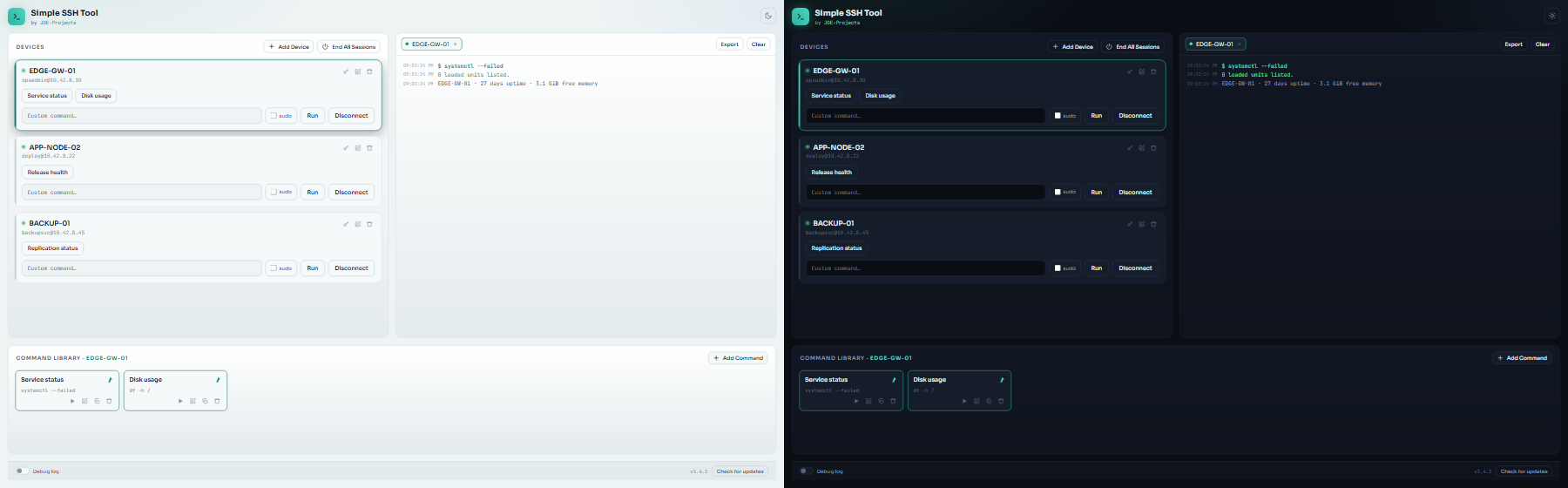
Built for
Administrators who repeatedly run the same set of commands across machines they manage.
- Build per-device command libraries with sudo, confirmation, and pinned buttons
- Open up to five independent SSH connections with separate console tabs
- Run saved or one-off commands with streamed output
- Export the active console and copy commands between saved devices
Get it
Both formats are on GitHub Releases. The site does not select or serve a version-specific binary.
- Installer (recommended): the file ending in
-setup.exe. Installs just for you with no admin, adds a Start menu shortcut, and removes cleanly from Add or Remove Programs. - Portable ZIP: the file ending in
.zip. No install, good for a locked-down PC or a USB stick. Keep the folder together.
The apps are not signed, so Windows SmartScreen may warn the first time you run one. Choose More info, then Run anyway.
Verify the download
You can check GitHub’s build-provenance record against the released file.
Installer:
gh attestation verify SimpleSSHTool-vX.Y.Z-setup.exe --repo JDE-Projects/Simple-SSH-Tool --signer-repo JDE-Projects/Build-ToolsPortable ZIP:
gh attestation verify SimpleSSHTool-vX.Y.Z.zip --repo JDE-Projects/Simple-SSH-Tool --signer-repo JDE-Projects/Build-ToolsLicense
PolyForm Noncommercial License 1.0.0. Personal use and evaluation are fine. Commercial use, including use by a business, is not permitted under this license yet.
If your team wants to use a tool at work, see commercial licensing on the support page.